Upduo Internship
Revamping content creation and scheduling for Upduo
Duration
June – August,
2022
My Role
UX Designer
Highlights
User flows,
Rapid Prototyping,
User Testing,
Design System
Tools
Figma,
FigJam
Overview
About Upduo
Upduo is a peer-to-peer coaching platform that connects employees and leadership with guided 1:1 video conversations so that they can learn from one another and drive measurable business outcomes.
Overview
My Contributions
- Defined problems in the current user flows of creating and scheduling lessons.
- Redesigned the user flows and information architecture.
- Conducted usability testing sessions with the education and engineering teams to gather feedback and iterate on the design.
- Created high-fidelity prototypes and handed them off to the engineering team.
- Built and maintained a design system to unify the user experience across mobile and web platforms.
Due to NDA, I can’t disclose all the details of my project, So to show my design process and the overall logic, I altered the actual interfaces and censored some sensitive parts in this case study.
Challenge
Background
Upduo guides employees through intentional conversations in video sessions with on-screen prompts around different topics that are created and scheduled by leadership users and the education team. If the contents are set up incorrectly, it can directly impact session experiences for all the participant users.
Currently, Upduo uses an additional doc to guide customer leadership users through the flow of creating content and scheduling topics, which takes extra effort and communication. And users sometimes miss certain steps in the flow.
Challenge
Problem Statement
How might we make the experience of creating content and scheduling topics on the Upduo web platform more intuitive and efficient?
Skip To Solution
Research
Defining Target Users
To begin the research phase, I gained an understanding of the various user groups of the Upduo web platform and identified the target users who are involved in the content creation and scheduling flows. These include the leadership users and the education team.

Participant Users
Employees who participate in the live topics

Administrator Users
Managers at various levels who monitor the engagement and progress of participant users

Leadership Users
Leaders who are responsible for creating content and organizing topic schedules

Education Team
The in-house team at Upduo that assists leadership users with content creation and offers expert advice
Research
Discovering Problem Space
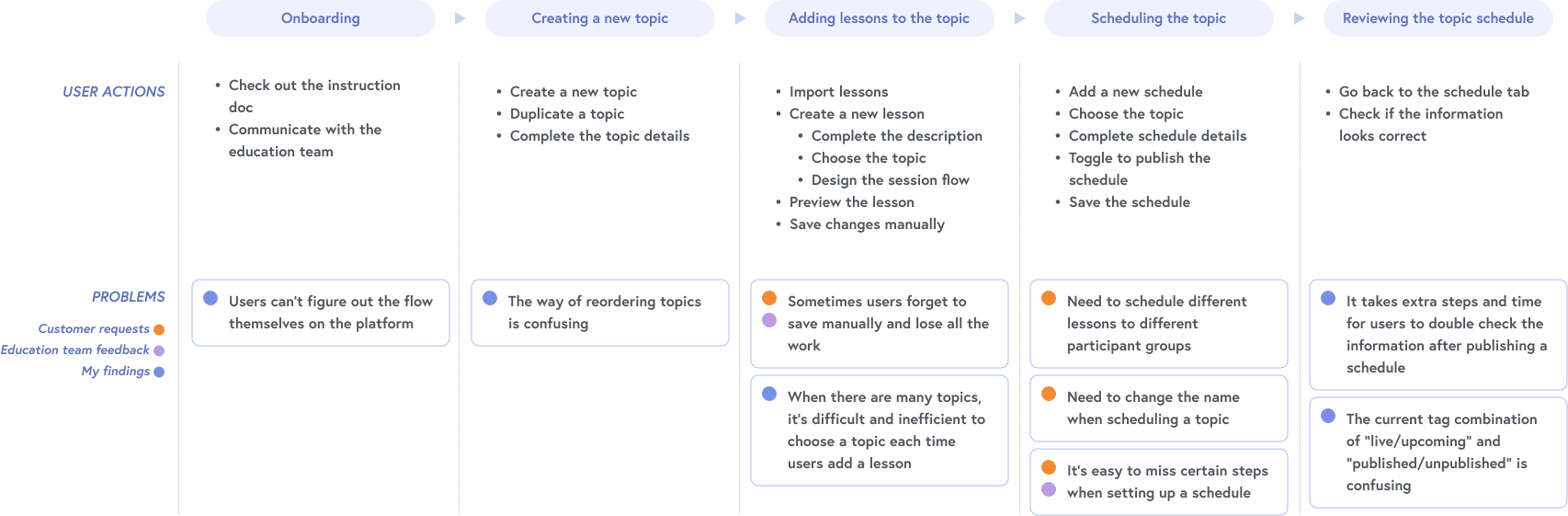
We have received several requests from customers and feedback from our education team regarding the content creation and scheduling experience. To gain a comprehensive understanding of the problem space and have a broad perspective, I mapped these and my findings through a current journey map.
Research
Understanding Problems
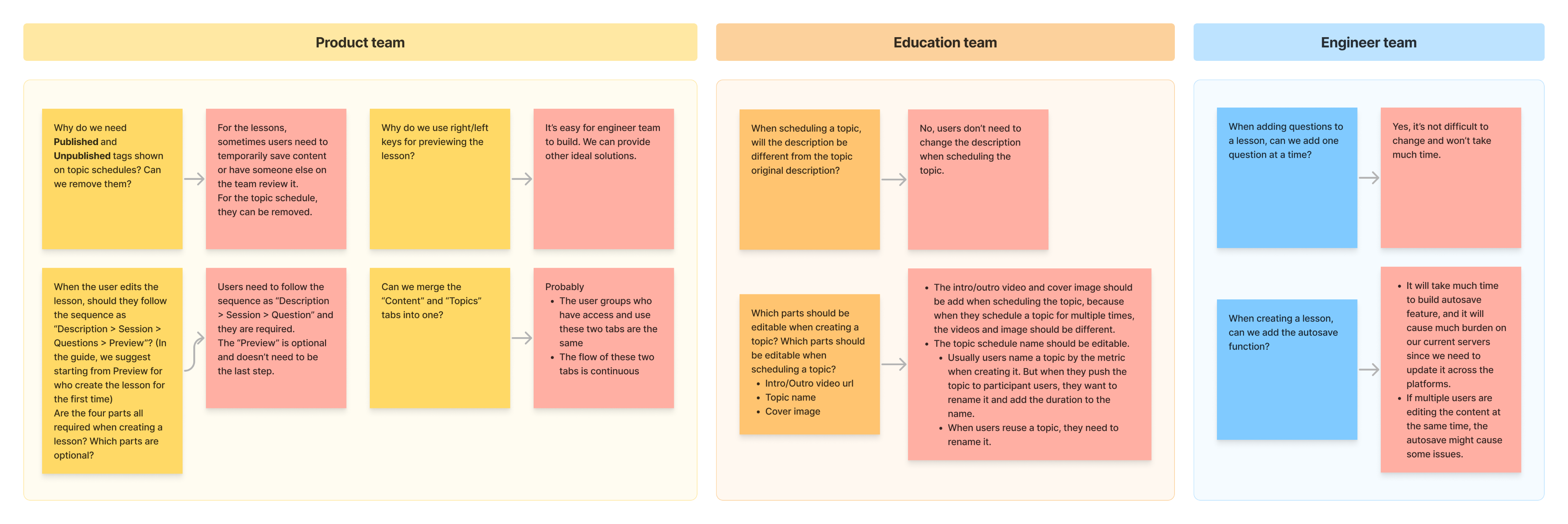
To gain a deeper understanding of the problems, user needs and our constraints, I reviewed internal documents and communications, and documented any questions and uncertainties I had. I then had discussions with the product team, education team, and engineering team to clarify my questions and gain insights. In the discussion, I also shared my initial ideas with the teams to see if they were feasible to move forward.
Research
Key Insights
After synthesizing my research and prioritizing the pain points, I distilled the following key insights:
The content hierarchy is unclear and does not align with the user flow, making it challenging for users to determine where to begin.
The current user flow is lengthy, disjointed, and lacking in guidance, leading users to miss some steps easily.

Certain interactions deviate from users’ habits, causing confusion and incorrect actions during the process.
Design
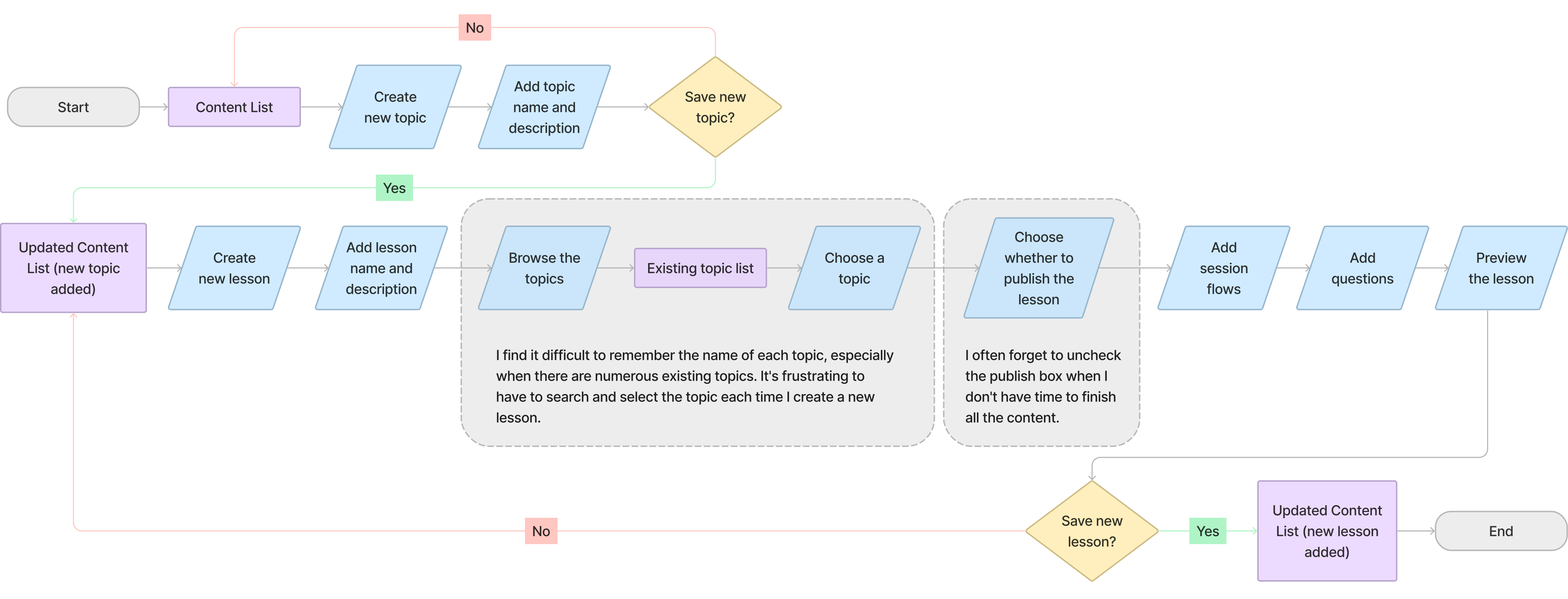
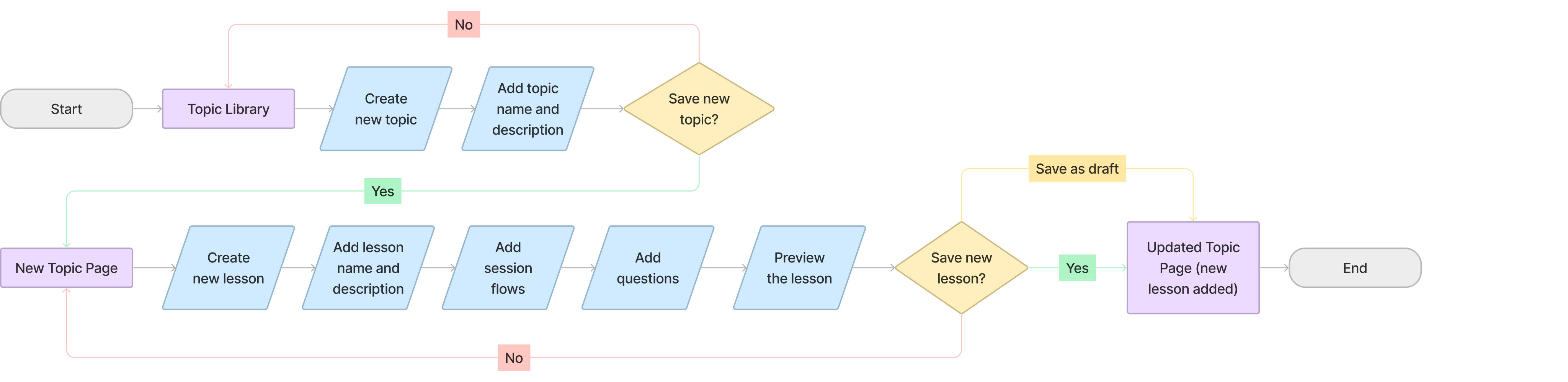
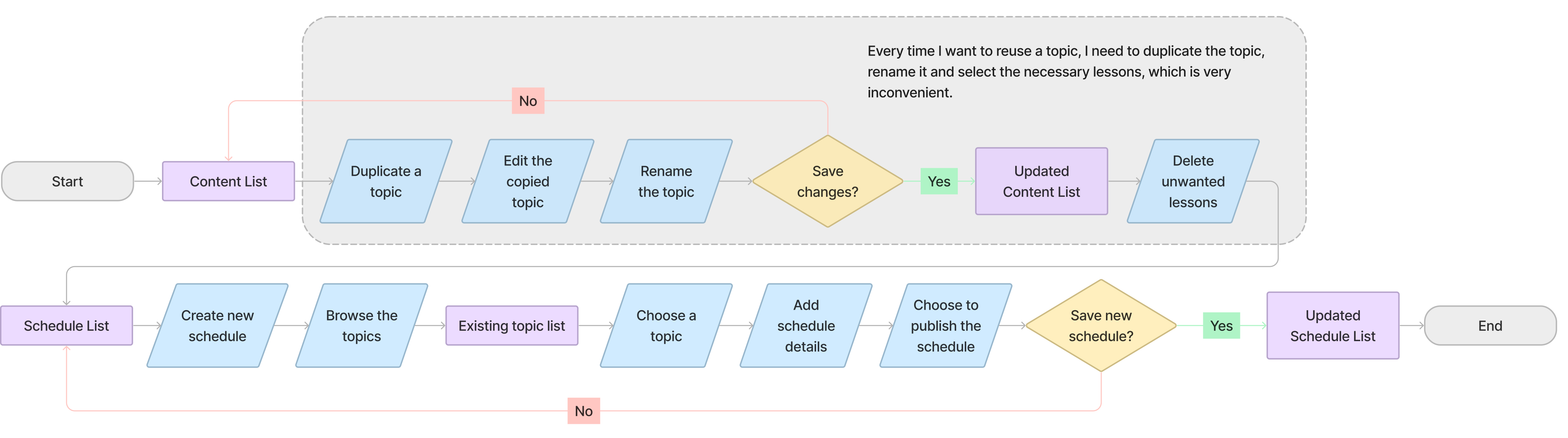
Reorganizing User Flows
To initiate my redesign process, I reviewed the existing user flows and identified the exact pain points. After thoroughly analyzing these pain points, I reorganized the user flows to deliver an enhanced user experience.
As a content editor, I want to create a new topic with several lessons.
Before
After
As a leader, I want to reuse a previous topic and schedule it for new employees.
Before
After

Design
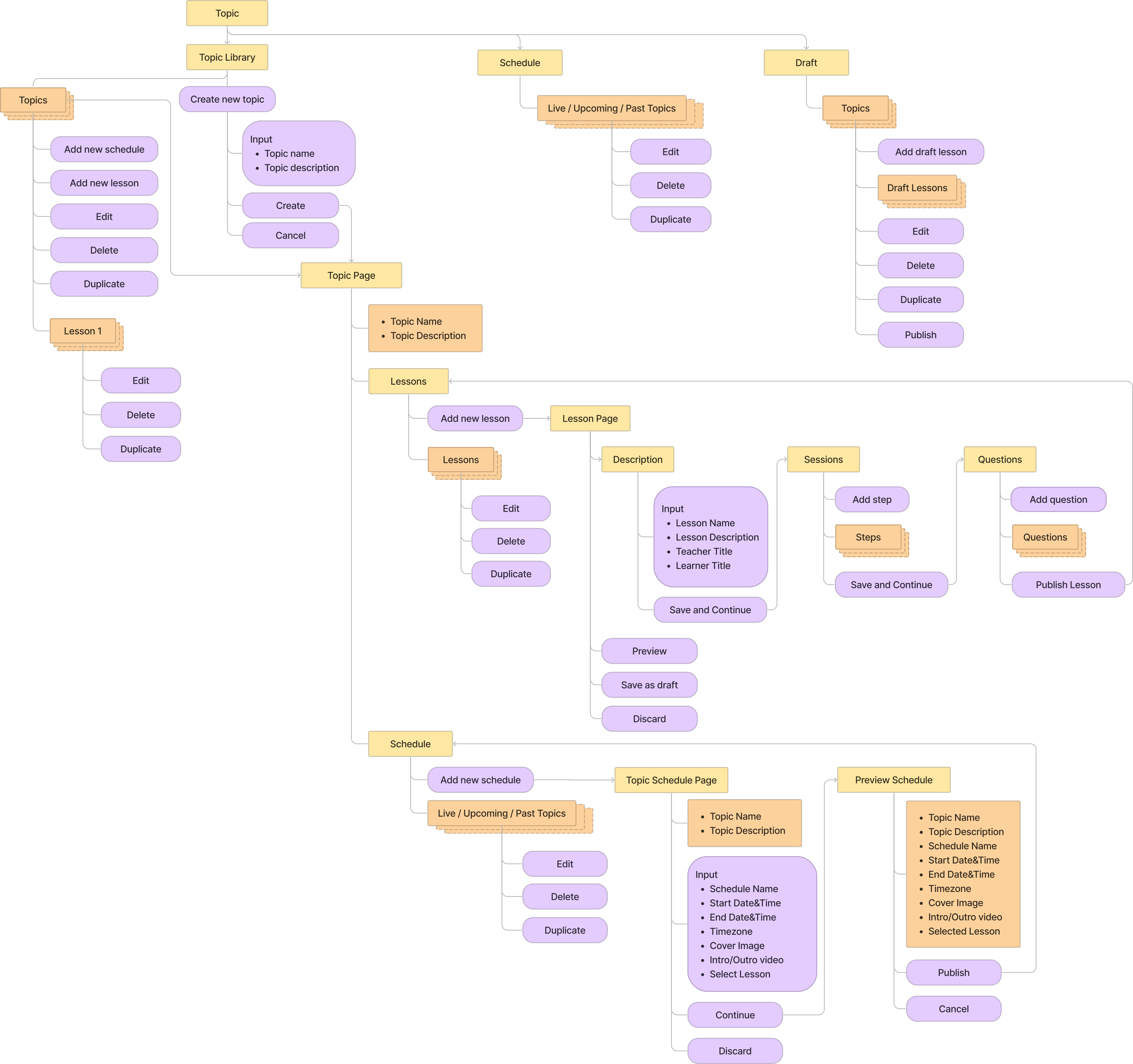
Information Architecture
I developed an information architecture to organize the overall hierarchy and content of each page, which then served as a foundation for creating rapid prototypes.
Design
Rapid Prototyping & User Testing
Building on the reorganized user flows and information architecture, I quickly developed mid-fidelity wireframes to conduct user testing with the education and engineering teams.
The objectives of the testing were to confirm the effectiveness of the new user flows, identify potential confusion, and verify the feasibility of the proposed adjustments.
Feedback from the education team:
- The new user flow and content hierarchy work well.
- Users are confused by having both “save and continue” and “save as draft” buttons on the same page when adding a new lesson.
- Users are uncertain if a topic has been successfully created.
- Users want the ability to view all content on the Topic Library, including drafts.
- Inconsistent use of terminology, such as “schedule” being used as both a verb and noun in different places, causes confusion.
Feedback from the engineering team:
- Feasibility of the proposed adjustments has been confirmed.
- Some adjustments, like enabling users to select lessons when scheduling topics, may require more time to implement.
Design
Iteration
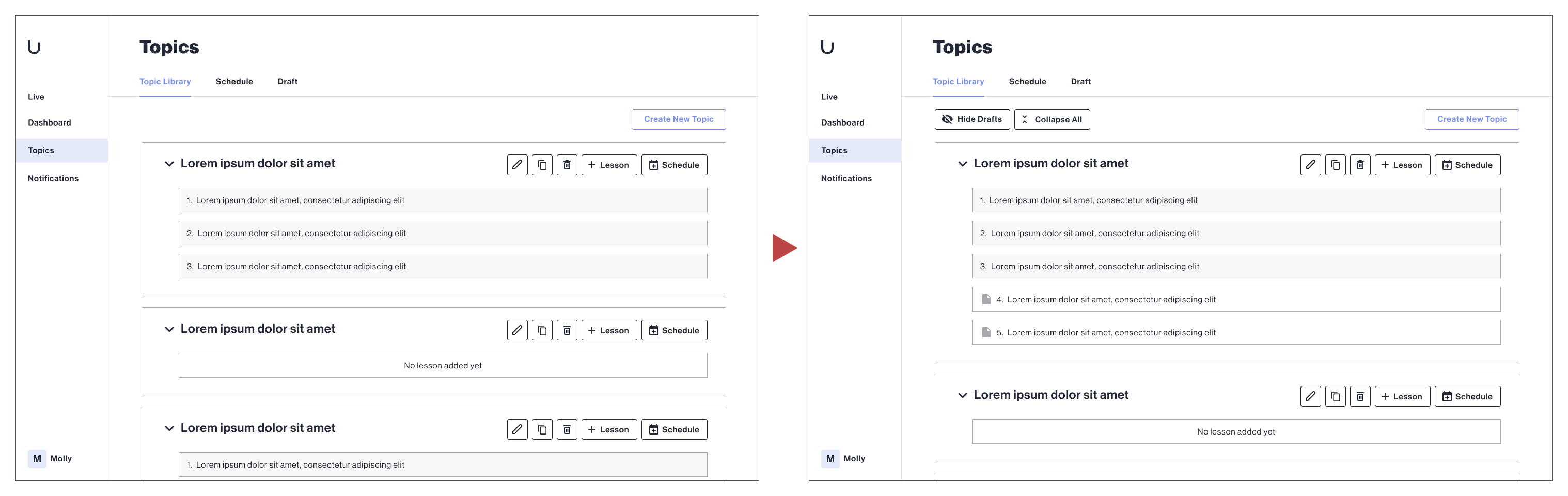
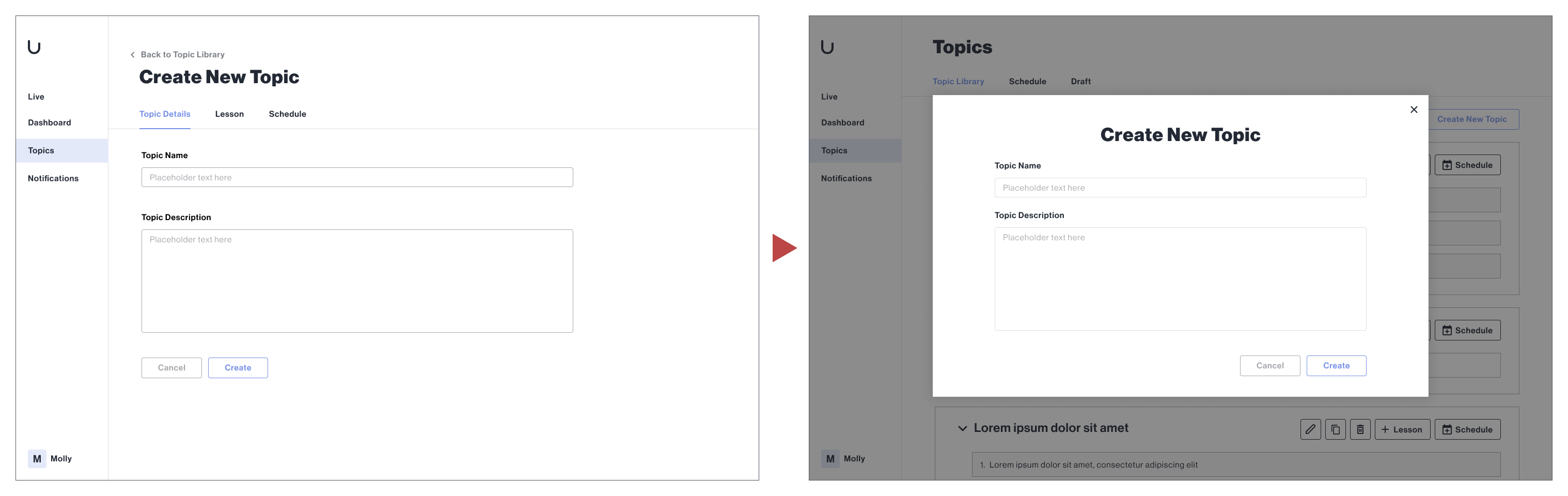
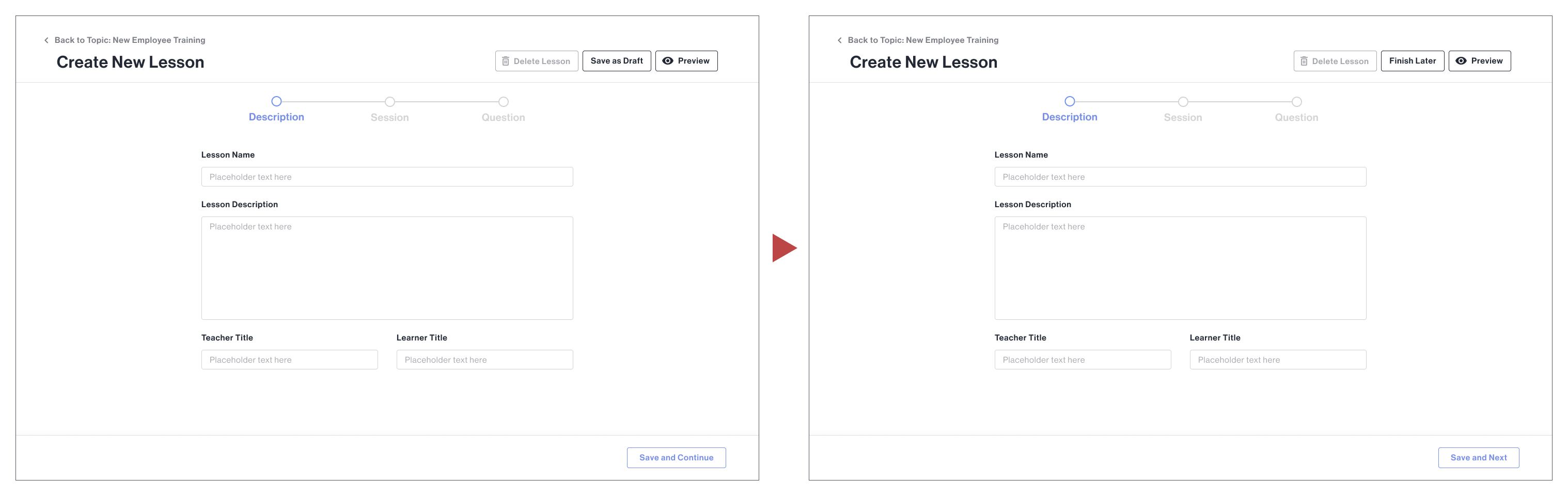
Based on the feedback from this testing, I iterated on my initial design and made further improvements, such as improving the visibility and accessibility of draft content in the Topic Library, clarifying the success of creating a new topic, and standardizing the terminology used throughout the platform.
Improve the visibility and accessibility of draft content in the Topic Library to support content creation.
Clarify the success of creating a new topic to help users manage their content more efficiently.
Rewrite the “save as draft” functions and standardize the terminology used throughout the platform to reduce confusion and errors.
Solution
Before & After
Problem #1
The navigation and layout hierarchy are confusing and unclear.
The navigation and layout hierarchy are confusing and unclear.
The visual presentation of unpublished content is unclear, which can easily lead to misunderstanding and errors.
The method of displaying topic schedules’ status is a combination of tags and titles, which is repetitive and confusing.
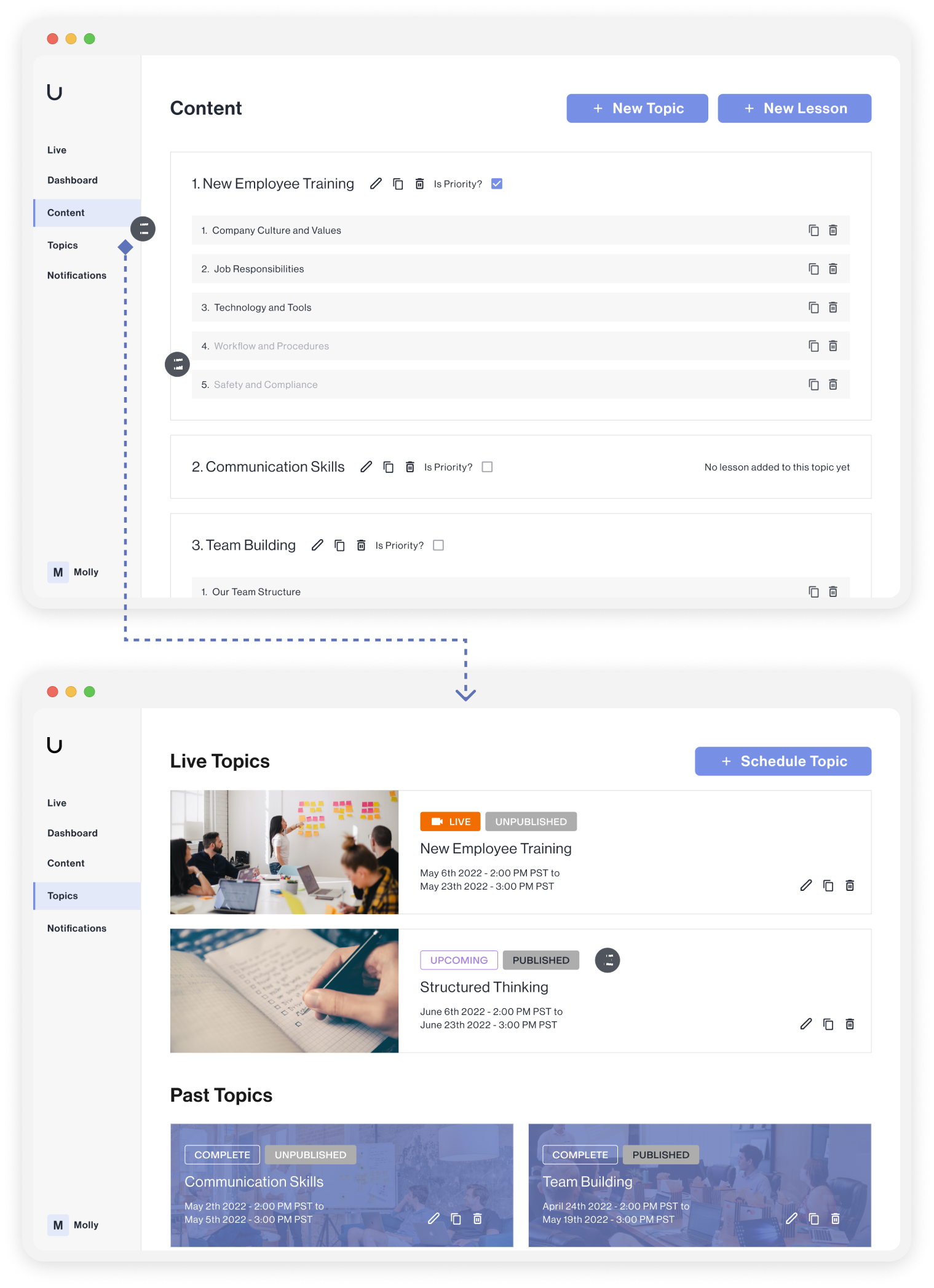
Solution #1
Merge two navigation tabs and reorganize the interface layout visually and logically.
The content related to managing and scheduling topic has been reorganized into three sub-tabs under “Topics”.
Make it easier to distinguish and handle drafts.
View schedules in different states more straightforward.
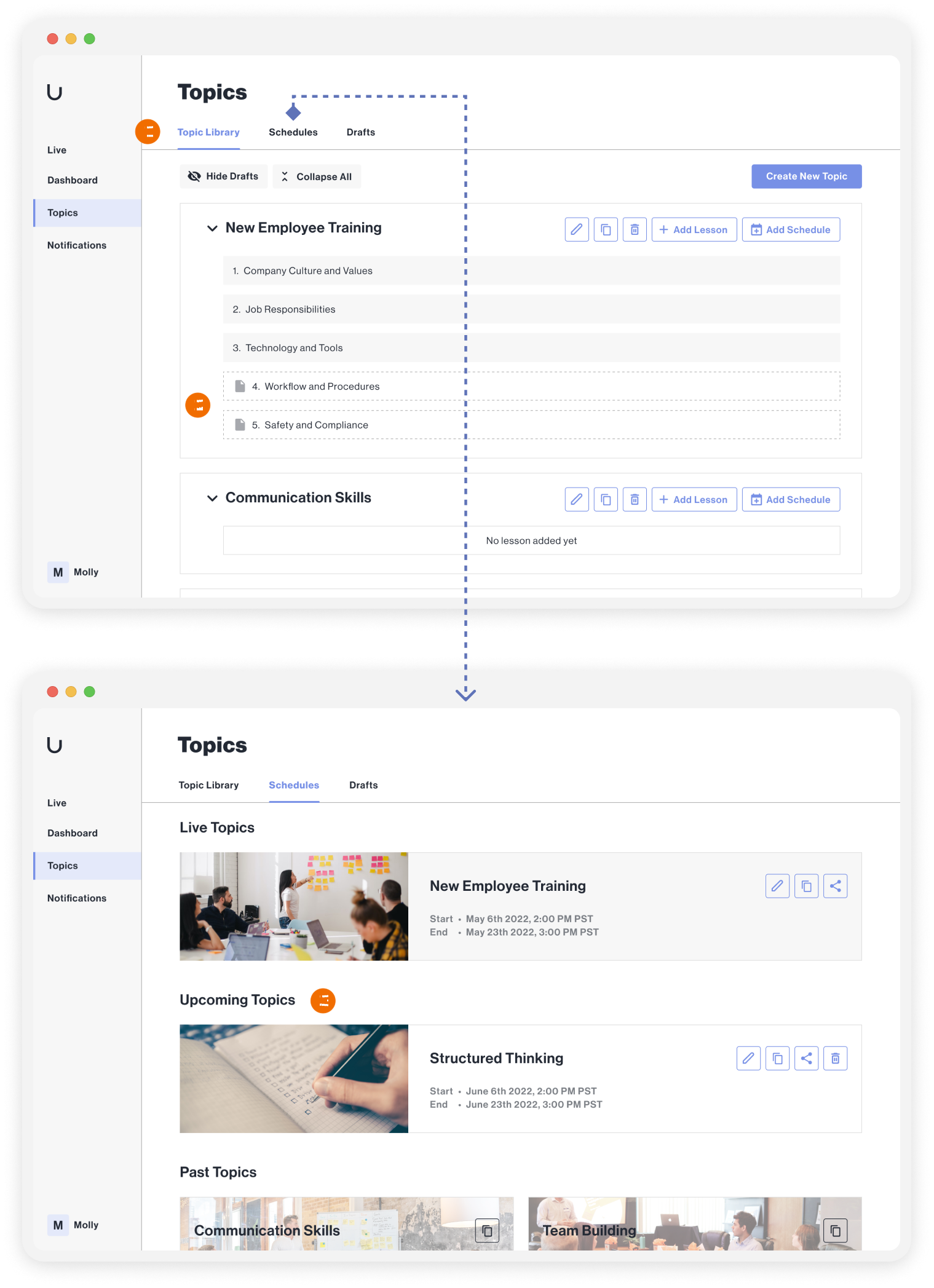
Problem #2
The user flows are inconsistent and lack guidance.
Users cannot determine the association and sequence between creating a topic and creating a lesson flow.
The sub-tabs does not indicate the user flow or required actions.
There is no prompt to notify users to save their work after completing each step.
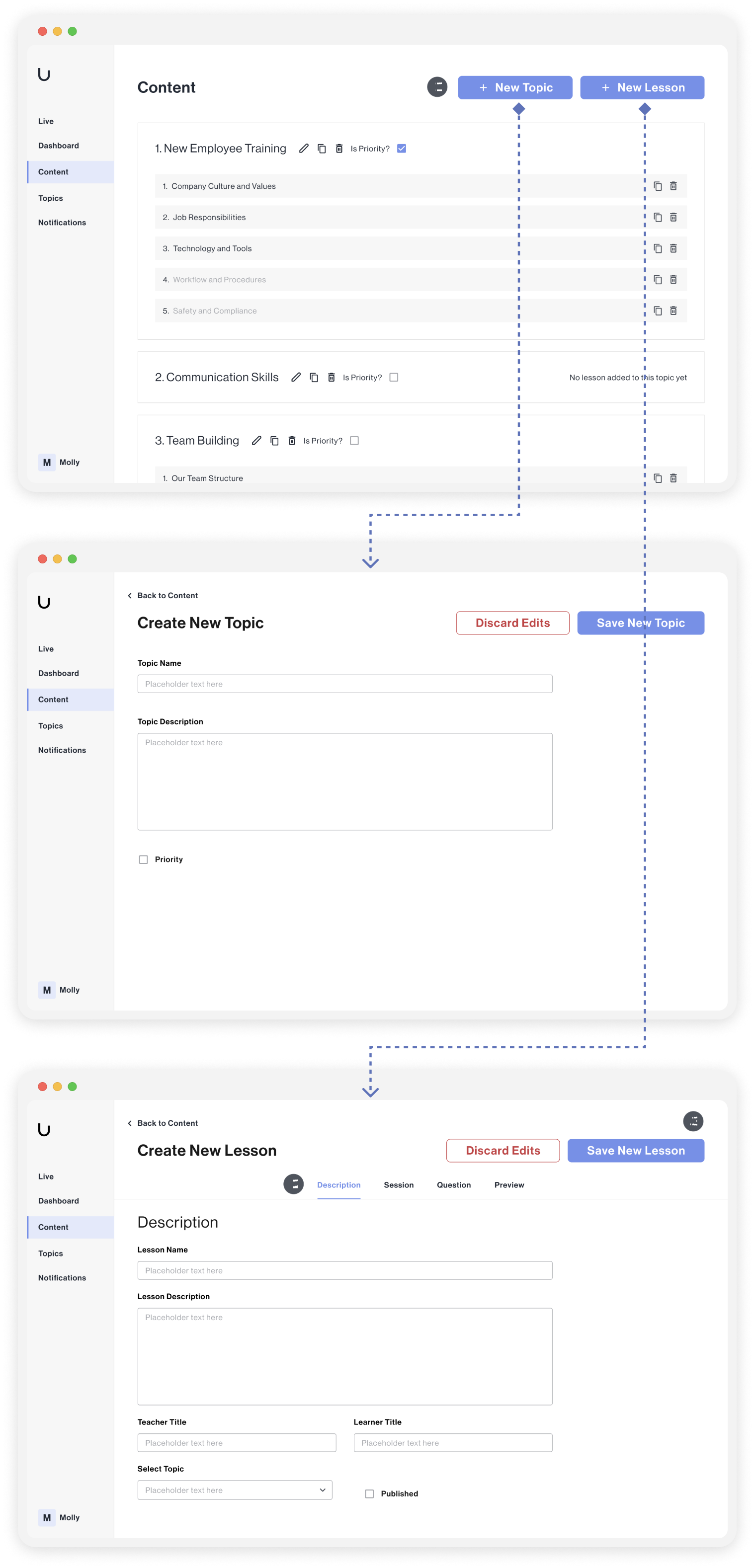
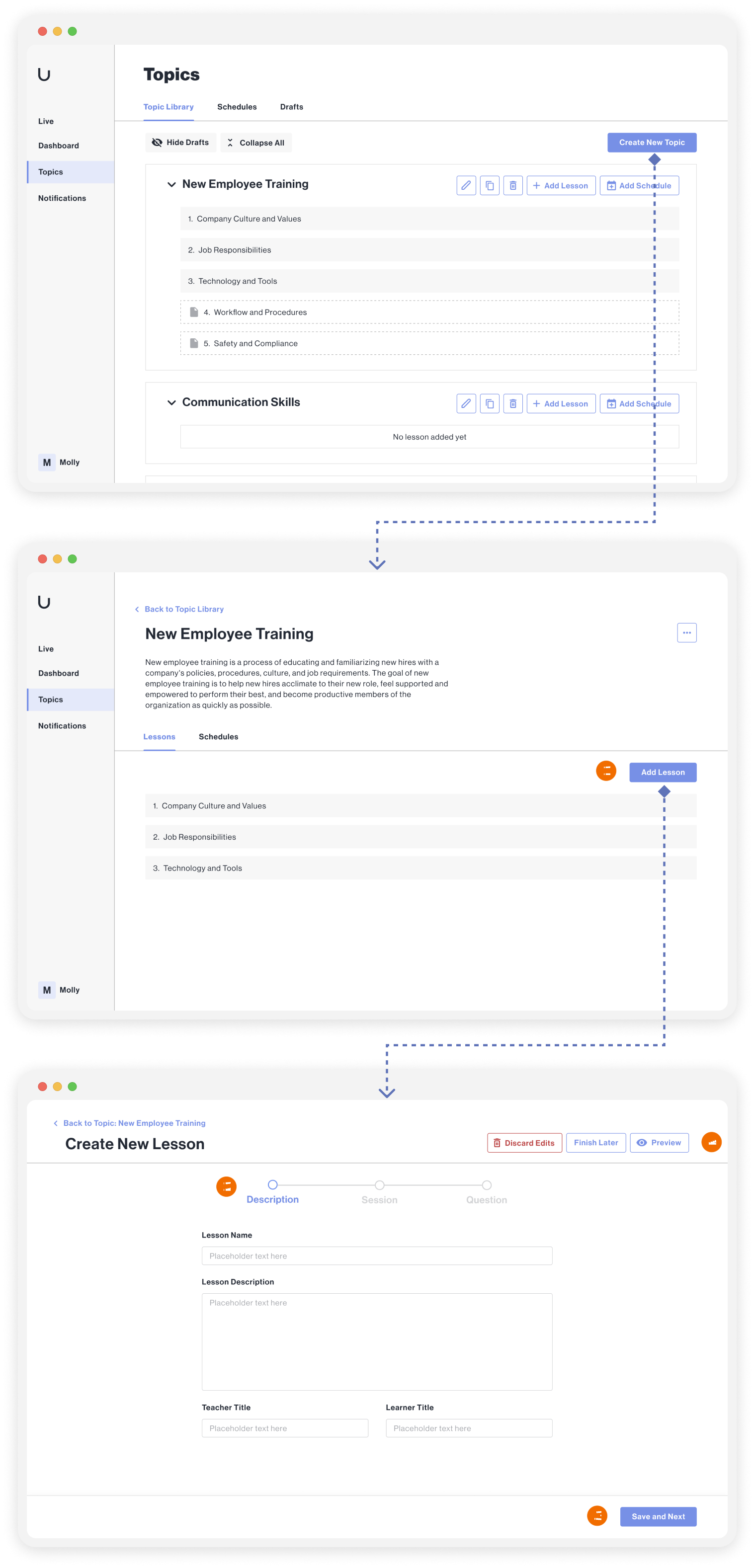
Solution #2
Integrate the flows and add progress checkboxes to guide users.
Add a topic page as a new level to connect the flow of creating a topic and creating lessons.
Add progress checkboxes to guide users through the flow.
Require users to save their work before proceeding to the next step.
Allow users to preview the lesson and save their work as a draft at any time.
Problem #3
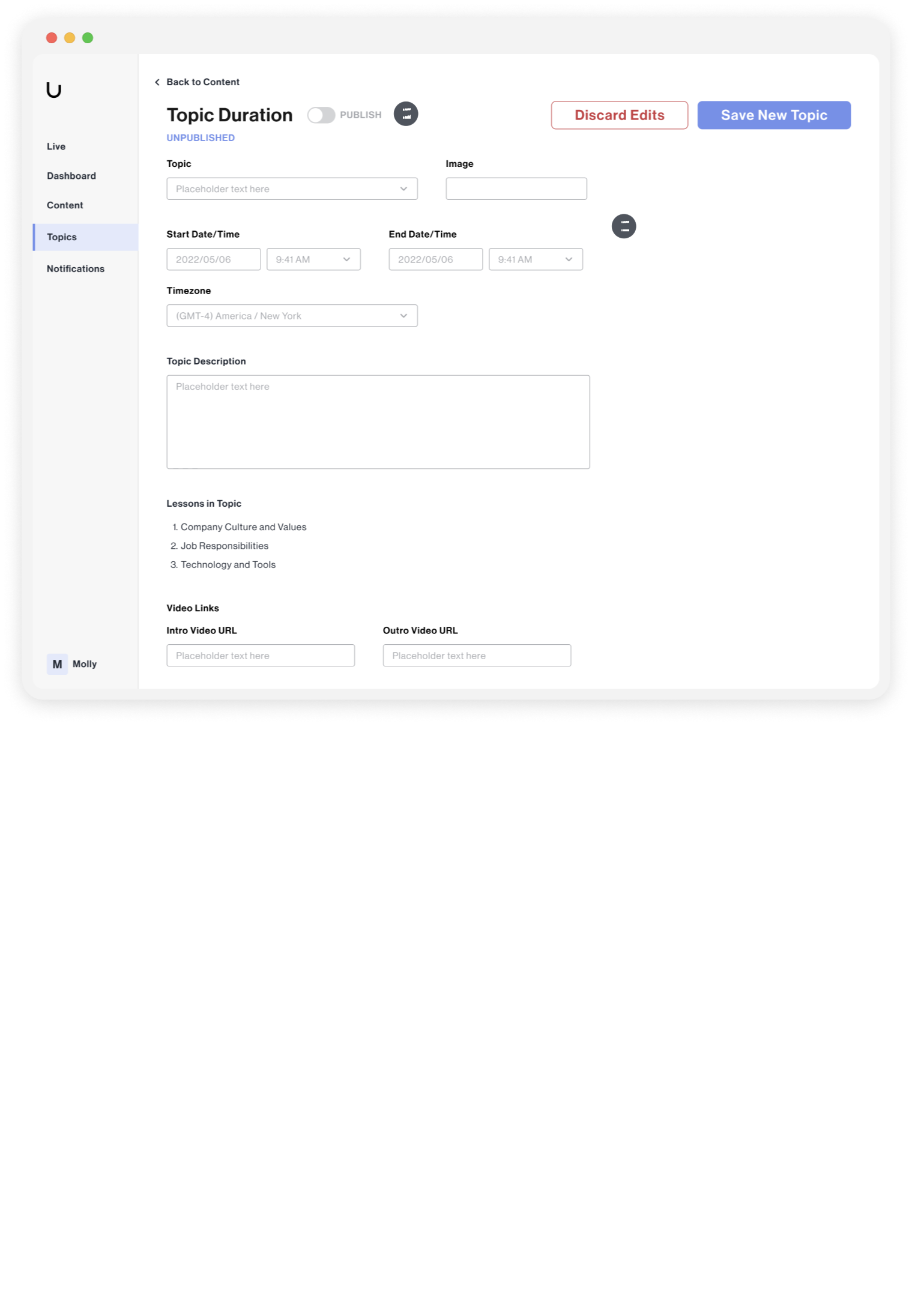
Repetitive actions can be involved, and certain steps may be easily missed.
The content that needs to be completed is disorganized.
The publish toggle is inconsistent with other content and can be easily missed.
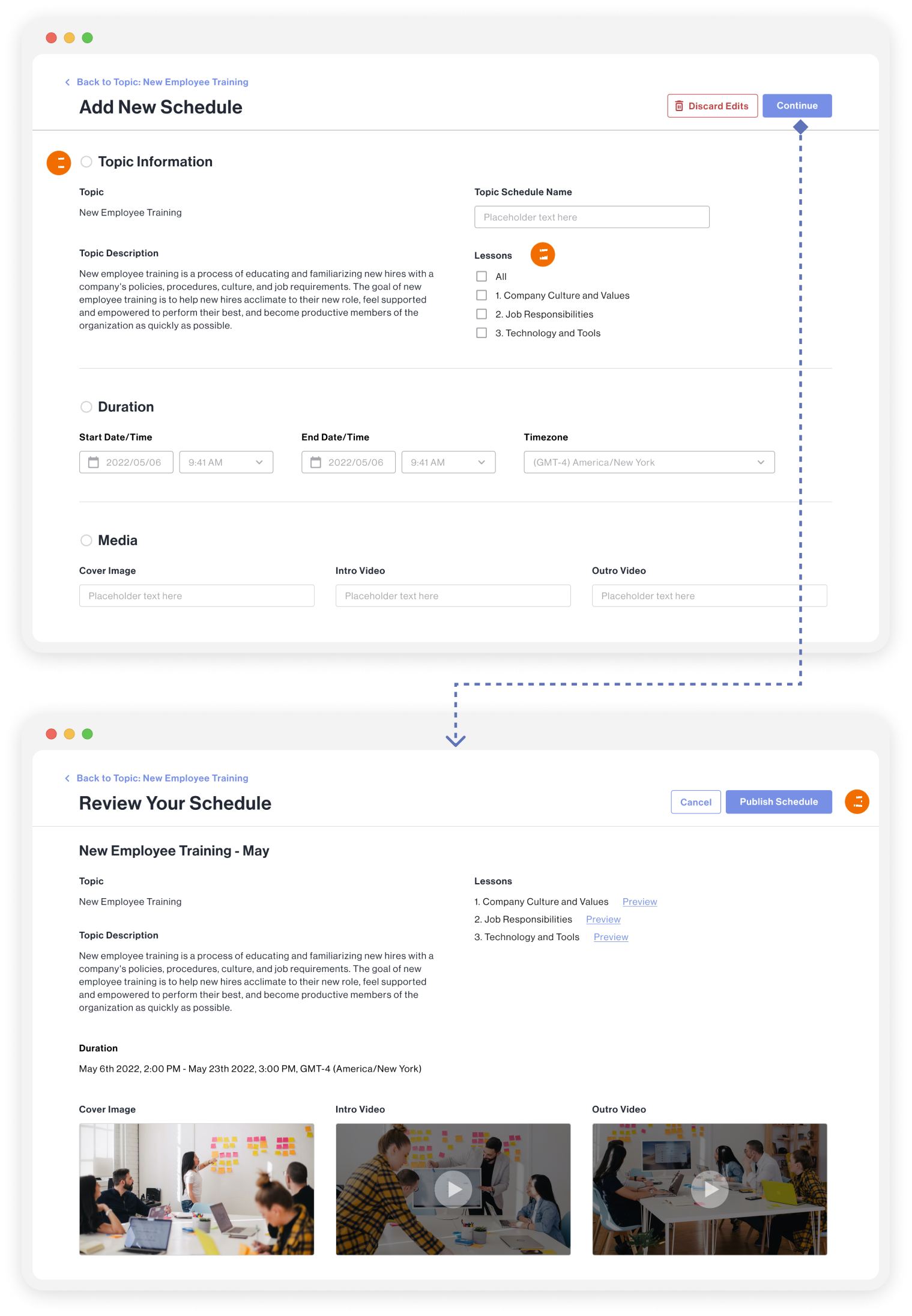
Solution #3
Redesign the topic schedule form to provide more flexibility and checkpoints.
Break down the form into multiple sections.
Allow users to rename the topic schedule and select the lessons involved.
Include a review step before publishing the schedule.
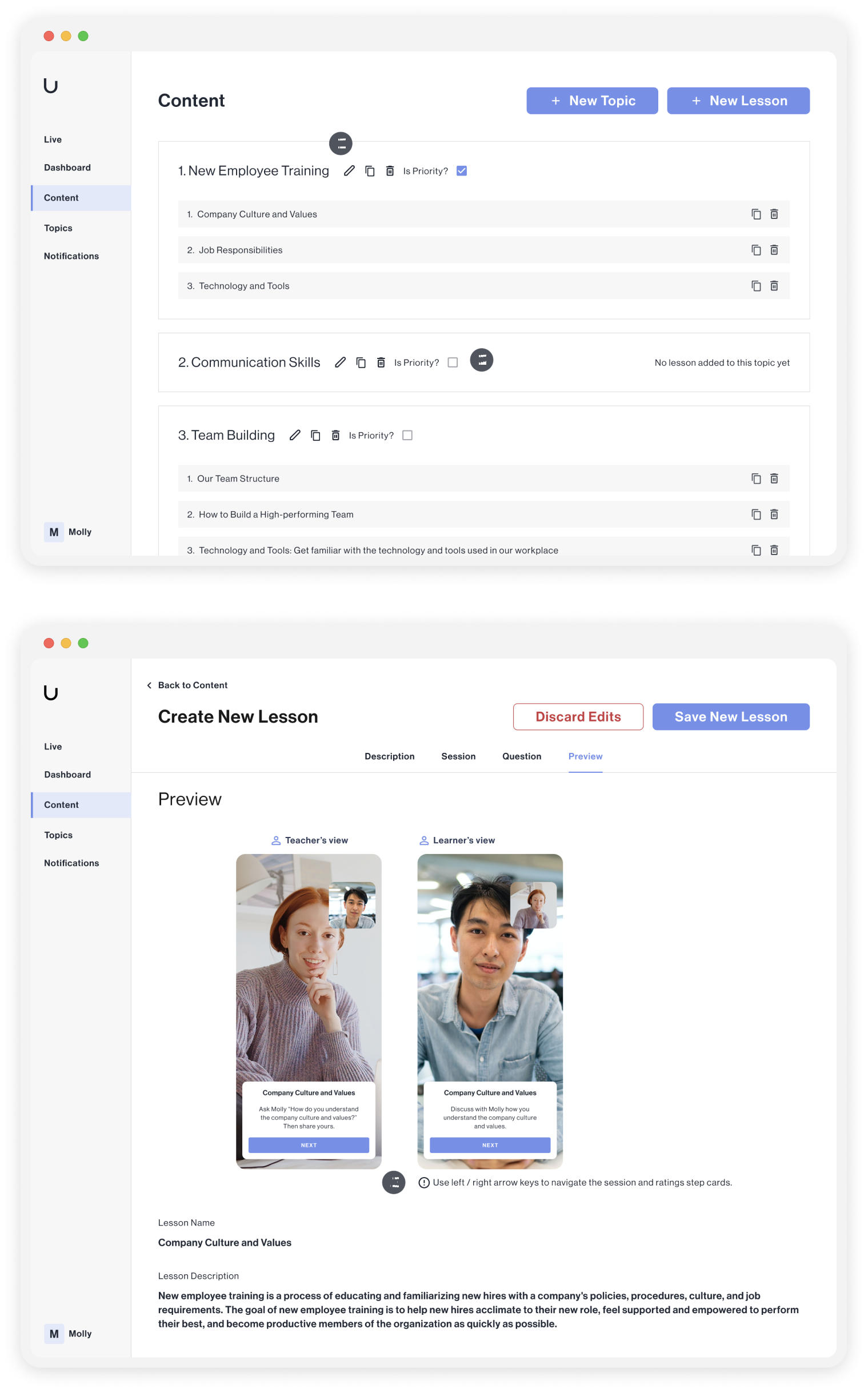
Problem #4
There is a lack of indications of available interactions.
The actionable components are unclear.
This sorting method is inconvenient and unintuitive.
This instruction message is easily overlooked.
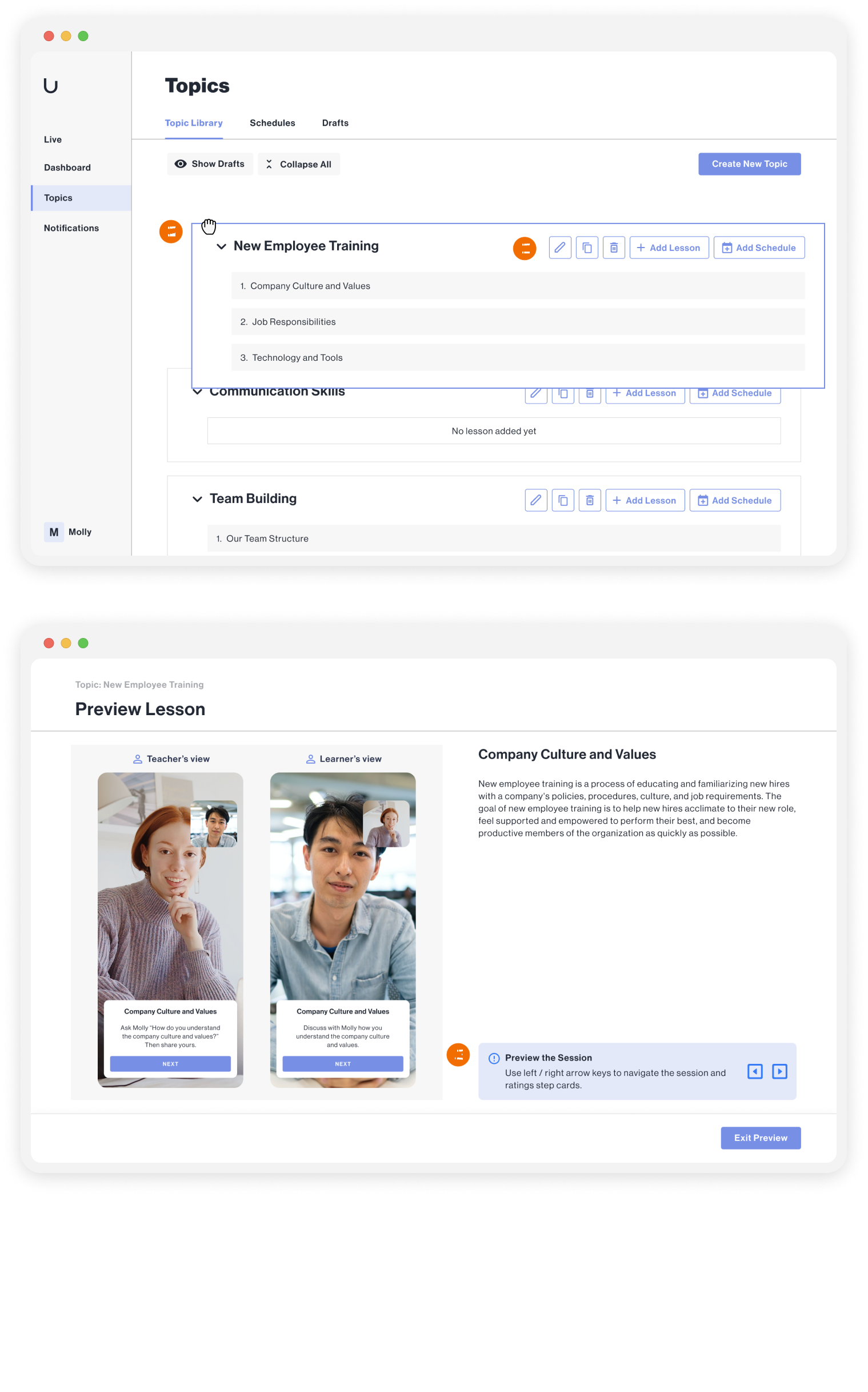
Solution #4
Improve the clarity of visual guidance and interaction.
More accessible and visible components.
Enable users to sort the topics by dragging.
Increase the visibility of the instruction message.
Solution
Highlighted Experience
View And Manage Content With A Clear Hierarchy
Create Content In A Coherent, Guided, And Well-Organized Flow
Add Topic Schedules Easily And Flexibly
Delivery
Design System
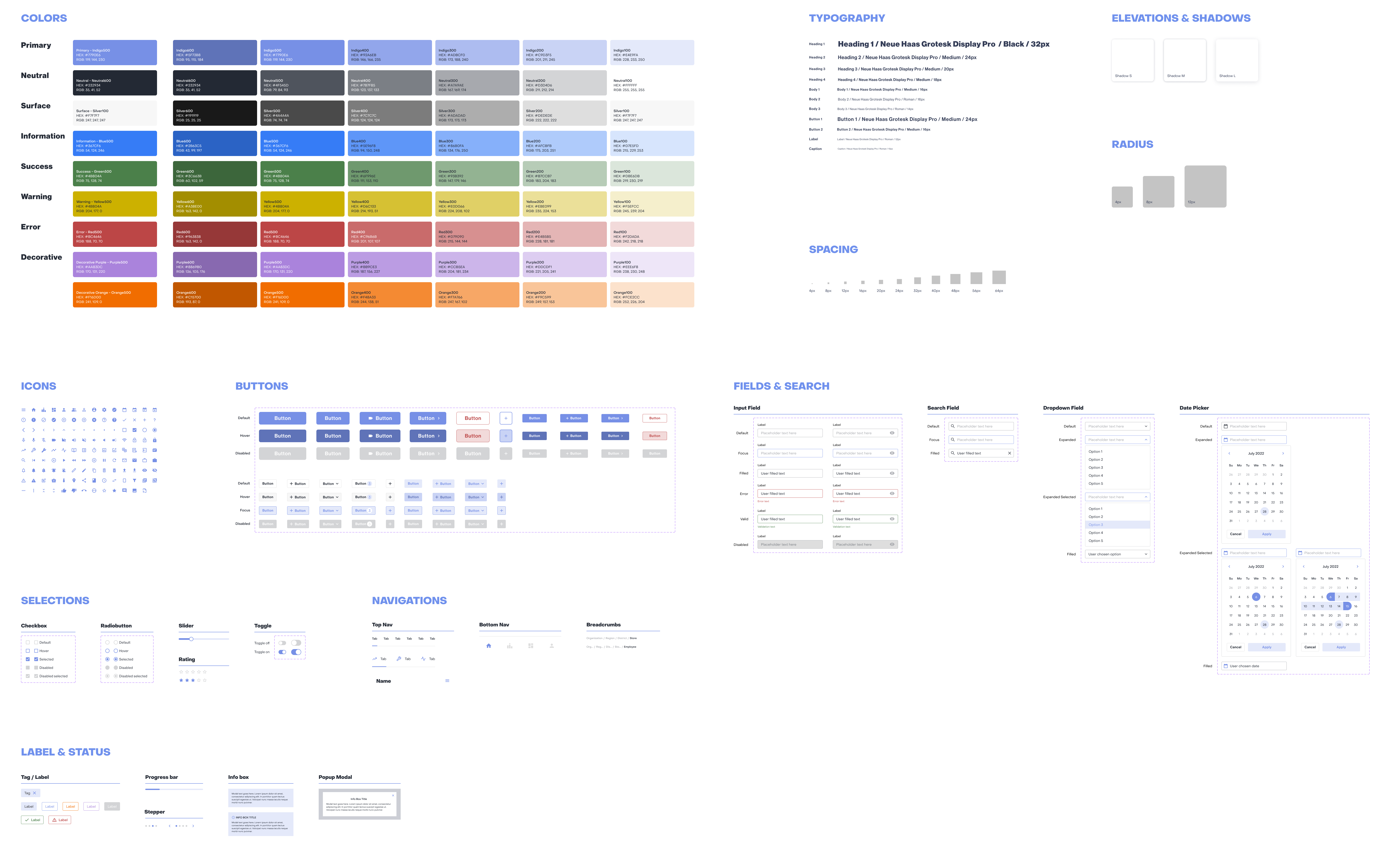
I created a Design System to ensure consistency throughout the platform and improve collaboration with the engineering team. The system defines different states of interactive components and verifies color and typography accessibility to meet WACG 2.1 Level A standards.
Reflection
Takeaways
Collaborate with cross-functional teams
During my internship, I worked in close collaboration with the product manager, engineering team, education team, and marketing team at Upduo. Through this process, I learned how to effectively seek help and communicate with each team based on the context of the project. I also engaged frequently with engineers to deliver design changes, verify feasibility of design solutions, and conduct usability testing. By taking technical constraints into account at an early stage, I was able to make informed design decisions.
Prioritize needs and tasks based on potential impact and team bandwidth
Working in a fast-paced and small-scale startup significantly enhanced my ability to prioritize tasks and requests effectively. I gained experience in breaking down complex design changes and devising a plan to execute them in stages. This taught me how to work efficiently and effectively in situations where resources are limited, while still delivering high-quality design solutions.
Reflection
Next Steps
If I have more time, I would track the impact and assess my design based on measurable metrics.
I believe in the importance of measuring the impact of design solutions to validate the assumptions and inform continuous iteration. If I had the chance, I would strive to establish measurable metrics for my designs and track their impact to gain a comprehensive understanding of their effectiveness.